




- What is a WhatsApp chatbot?
- How to use a WhatsApp chatbot: Practical examples
- How to create a WhatsApp chatbot
- Avosist WhatsApp chatbot features
- Create your WhatsApp chatbot with Avosist
- Avosist's visual chatbot builder
- Frequently Asked Questions
- Start your WhatsApp chatbot experience with Avosist
Automate your WhatsApp sales with Avosist AI
Create accountAre you struggling to follow up with WhatsApp customers smoothly during the sales process? Is the lack of an efficient follow-up system slowing down your response times? Do not miss opportunities to grow your business.
The solution is much simpler than you think: use a WhatsApp chatbot. Chatbots are an ideal tool for automating your communication flow and providing customers with a seamless experience. In this guide, you will learn step by step what a WhatsApp chatbot is, how it works, practical use cases, and how to set one up in minutes with a platform like Avosist.
What is a WhatsApp chatbot?
Simply put, a WhatsApp chatbot is a computer program designed to automatically respond to your customers through WhatsApp. Using predefined triggers and actions, a chatbot can provide customers with immediate, relevant responses and service without you lifting a finger.
Modern chatbots use artificial intelligence (AI) or natural language processing (NLP) technologies to understand and respond to customer questions conversationally. In other words, they are not limited to "Yes/No" buttons; they can even understand questions written in different ways and generate the correct response.
💡 WhatsApp chatbot: A computer program that chats with users on WhatsApp using predefined rules or artificial intelligence. It automates communication within the WhatsApp platform and provides uninterrupted service 24/7.
In the traditional customer service model, a person must respond to every message. This leads to delays during busy periods, missed sales opportunities, and exhausted teams. A WhatsApp chatbot breaks this cycle: it automates routine questions and forwards only the issues that genuinely require human intervention to your team.
How to use a WhatsApp chatbot: Practical examples
How you use your WhatsApp chatbot depends entirely on your business needs. The five scenarios below illustrate realistic use cases from different industries.
Example 1: 👋 Welcoming customers
You run a clinic, consulting firm, or e-commerce store, and responding immediately to every incoming message is becoming difficult. A WhatsApp chatbot greets customers with a warm welcome message, lists service categories, and manages wait times. The customer does not "leave the store"; a professional impression is created from the very first interaction.
Example 2: 💬 Automated follow-up
What do you do when a customer goes silent after asking for a price? Most businesses miss this opportunity. A WhatsApp chatbot keeps the customer in the sales process by sending an automatic follow-up message after a set period. Appointment reminders, quote follow-ups, and "are you still interested?" messages all run automatically.
Example 3: 💰 Completing the sales process end to end
Depending on your products and services, a WhatsApp chatbot can manage the entire process from the customer's first contact to closing the sale. The chatbot can showcase your products, answer questions, and even complete the purchase by sending a payment link — without a single line of intervention from your team.
Example 4: 📢 Promotion and campaign management
A WhatsApp chatbot can send engaging promotions, share special discount codes, and run marketing campaigns. Sending personalized campaign messages to segmented lists delivers open and conversion rates far beyond those of traditional email marketing.
Example 5: 😊 Customer service and order tracking
When a customer on an e-commerce platform asks where their order is, a WhatsApp chatbot can instantly send delivery information, the shipment tracking number, and the estimated arrival time from the integrated system. Customer satisfaction increases while your support team's workload decreases.
How to create a WhatsApp chatbot
To create a WhatsApp chatbot, you need to choose a platform with WhatsApp Business API integration. WhatsApp's personal app or basic Business app is not sufficient for automation; WhatsApp Cloud API is required for a genuine chatbot experience.
You can connect directly to the WhatsApp Cloud API through Meta, but this method requires technical work such as server management, webhook configuration, and template approval processes. A much more practical approach is to access the API through an AI platform like Avosist: the technical infrastructure is fully ready, so you can focus solely on designing your chatbot flow.
| Method | Technical Requirement | Setup Time | Automation Scope |
|---|---|---|---|
| WhatsApp Business App | None | Instant | Very limited |
| Direct Cloud API (DIY) | High (developer team) | Weeks | Full scope |
| Cloud API with Avosist | None | Minutes | Full scope + AI |
Avosist WhatsApp chatbot features
Avosist is an omnichannel AI assistant platform developed to help businesses build meaningful connections with customers on WhatsApp. It offers numerous features that improve your chatbot's responsiveness and make it easier to manage conversations and automate workflows.
1. Rich message formats
With Avosist, your chatbot sends more than text; it supports all of the following formats:
- Quick reply buttons — direct customers to the right flow with a single click
- Interactive list messages — menus offering up to 10 options
- Product carousels — a visual product catalog directly in the chat
- WhatsApp Flows — multistep forms and survey flows
- Media support — video, images, PDFs, and audio files
2. Automated CRM actions
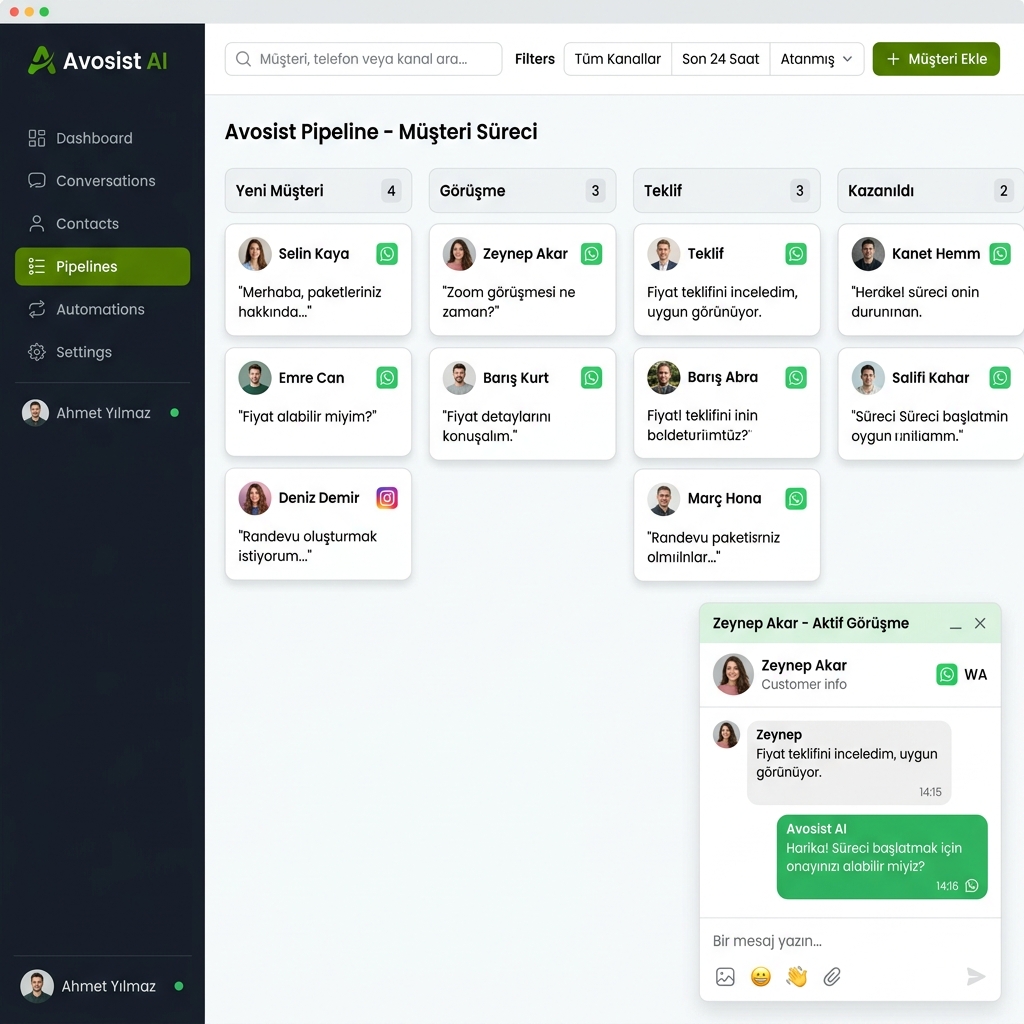
The Avosist chatbot does more than talk; it automatically reflects every interaction in your CRM. It adds sales-critical data such as email addresses, phone numbers, and company information to the customer record. It moves leads to the correct stage of the sales pipeline and sends an instant notification to the team when a representative is needed.
3. AI-powered understanding
Avosist's AI engine understands the intent behind customer messages. When different expressions such as "What is the price?", "How much does it cost?", and "Fee?" convey the same intent, the chatbot generates the correct response — without being confined to a button menu, delivering a genuine conversational experience.
4. Personalized messages
The chatbot automatically adds the customer's first name, last name, and company information from the customer record to messages. Personalization such as "Hello [Name]!" is a small but powerful detail: customers feel valued, and response rates increase.
5. Payment and invoicing integration
Avosist supports creating invoices and sending payment links directly from within the chatbot flow. The sales process is not limited to conversation; payment is completed in the same chat window.
6. Net Promoter Score (NPS) collection
When a conversation ends, the chatbot automatically asks the customer to rate the service. If a low score is received, your team gets an instant notification. This allows you to identify and address customer dissatisfaction in real time.
24/7 AI Assistant
Answers customer questions day and night and ensures sales opportunities are not missed.
Automated CRM
Every chat automatically becomes a customer record, so no data is lost.
Payment Integration
Create an invoice, send a payment link, and complete the sale in the chat.
NPS and Feedback
Automatic rating collection and an instant alert system at the end of a conversation.
Create your WhatsApp chatbot with Avosist
To create your first WhatsApp chatbot in Avosist, you need the following:
- An Avosist account
- A phone number that is not linked to an existing WhatsApp account
- A personal Facebook profile and a Facebook Business Page connected to it
Step 1: Set up WhatsApp Business integration
After signing in to your Avosist account, go to Settings → Channels → WhatsApp. Follow the on-screen steps to connect your Facebook Business Manager account and verify your phone number. This process takes an average of 5-10 minutes.
Step 2: Create your template messages
You need to create your chatbot's first message as a template. Prepare your template in Avosist's template manager; you can add quick reply buttons and emojis. Once Meta approves the template — usually instantly, and rarely within 24 hours — it is ready to use.
Step 3: Open the visual chatbot builder
Avosist's drag-and-drop chatbot builder lets you design complex conversation flows without writing code. You can create flows that branch according to customer responses, include conditional steps, and update CRM data.
Step 4: Add synonyms and conditions
What happens if a customer types a response instead of using a button? Avosist's synonym feature maps similar expressions such as "Yes", "Okay", and "Sure" to the same trigger. This keeps the chatbot flow from getting stuck on unexpected responses.
Step 5: Test and publish
You can test the flow you created from your own number. If everything is working properly, activate the bot. Your customers will now receive automated responses 24/7, while your team focuses only on conversations that genuinely require human intervention.
Avosist's visual chatbot builder
With Avosist's chatbot builder, you can easily design the following interaction types:
- Quick reply buttons — a maximum of 3 buttons for one-click routing
- Interactive list messages — menus with up to 10 options
- Single and multiple product messages — catalog integration
- WhatsApp carousels — horizontally scrollable product cards
- WhatsApp Flows — in-app form experience
- File and media sending — e-books, brochures, and price lists
At every step, you can fill in customer record fields, change the stage in the sales pipeline, assign tasks to team members, or trigger an automatic email. The chatbot does more than talk; it manages the entire customer journey.
Avosist's chatbot templates let you start from a ready-made structure instead of beginning from scratch. You can customize prebuilt flows for common scenarios such as welcoming customers, qualifying leads, tracking orders, or collecting NPS according to your own business processes.
Build your WhatsApp chatbot with Avosist today
No technical knowledge required. Set up your WhatsApp Cloud API connection in minutes, create your first chatbot flow, and reduce customer response times by eighty percent.
Try It Free →Frequently Asked Questions
Do I need technical knowledge to set up a WhatsApp chatbot?
When you use a ready-made platform like Avosist, you do not need technical knowledge. You can design complex chatbot flows without coding using the drag-and-drop visual builder. The WhatsApp Cloud API connection is also managed by the platform.
How do I transfer a conversation between a WhatsApp chatbot and a human representative?
When a customer wants to speak with a representative or moves outside the chatbot flow, Avosist automatically hands the conversation over to the appropriate team member and sends a notification. The transition is seamless, so the customer does not experience a different service.
Is a WhatsApp chatbot compliant with KVKK and GDPR?
Avosist uses the WhatsApp Cloud API infrastructure. Customer data is managed within the framework of Meta's data processing agreements. Commercial messages may be sent only to users who have given consent; these rules support legal compliance.
Can I manage multiple WhatsApp numbers on the same platform?
Yes. Avosist lets you manage multiple WhatsApp numbers from a single panel. You can use separate numbers for different departments or brands and view all incoming messages in a centralized inbox.
How long does it take to set up a WhatsApp chatbot?
With Avosist, a basic chatbot flow can be set up within 30-60 minutes. Together with WhatsApp number verification and Meta template approval, it can go live on the first day.
Start your WhatsApp chatbot experience with Avosist
A WhatsApp chatbot is one of the most powerful tools for fundamentally transforming your business's customer communication. 24/7 responsiveness, automated sales follow-up, personalized messages, and direct payment integration — all in a single chat window, on a platform your customers already use in their daily lives.
In this guide, you learned what a WhatsApp chatbot is, how it is used in different scenarios, and how to set one up step by step in Avosist. Now all you need to do is get started. Create your first bot and see the difference it makes to your customer communication firsthand.
- Shorten response times by up to eighty percent with a WhatsApp chatbot
- Automate routine questions so your team can focus on real sales
- Automatically save leads to your CRM with zero data loss
- Get started in minutes with Avosist, without technical setup
Try it now — create your first bot
Sign up for Avosist, connect your WhatsApp number, and publish your first chatbot flow today.
Get Started Free →