




- What is a CRM?
- What Does a CRM Do? From a Small Business Perspective
- Types of CRM: Which One is Right for You?
- How to Set Up a CRM for Small Businesses?
- WhatsApp and CRM Integration: The Weapon of the Modern Small Business
- CRM Selection Criteria for Small Businesses
- WhatsApp-Based CRM with Avosist: Featured Features
- 5 Critical Mistakes Small Businesses Make in CRM
- Frequently Asked Questions
- Conclusion: CRM is No Longer a Luxury, It's a Basic Need
Automate your WhatsApp sales with Avosist AI
Create accountHaving trouble remembering what you discussed with a customer last week? Working without knowing how many people you sent sales proposals to, how many returned, or why others backed out? Trying to track all this in Excel while dealing with dozens of customers every day is actively holding back your growth.
The tool that steps in right at this point is CRM — which stands for Customer Relationship Management system. In this guide, you will learn step-by-step what a CRM is, why it is critically important for small businesses, and how it works integrated with modern tools like the WhatsApp AI assistant.
What is a CRM?
CRM is an acronym for the English words Customer Relationship Management. It translates to Customer Relationship Management in Turkish. Its primary purpose is to ensure that a business records every touchpoint it establishes with current and potential customers — phone calls, emails, WhatsApp messages, meetings, purchases — in a single centralized system.
Simply put: CRM is the memory of your business. Even if you forget, the system remembers.
💡 Definition: CRM is a software system that manages customer information, communication history, and sales processes on a centralized platform, enabling businesses to deal with each customer more personally and timely.
Salesforce research documents that businesses using CRM worldwide experience an average 34% increase in sales efficiency and a 47% rise in customer satisfaction. Considering that only 28% of SMEs in Turkey use a CRM system, a significant competitive advantage can be captured in this area.
What Does a CRM Do? From a Small Business Perspective
Everyone knows large companies use CRM. So, is CRM really necessary for small businesses? The answer is a definitive yes — in fact, it is more critical for small businesses compared to large ones. Because in small teams, tracking each customer separately is much more costly in terms of both time and resources.
1. Customer Tracking and Recording
Who called, what did they want, what was offered, when should they be followed up — all these are automatically recorded in the CRM. Thus, when any member of your team opens the customer file, they see the full picture. Even if your sales team changes, no customer information is lost.
2. Sales Pipeline Management
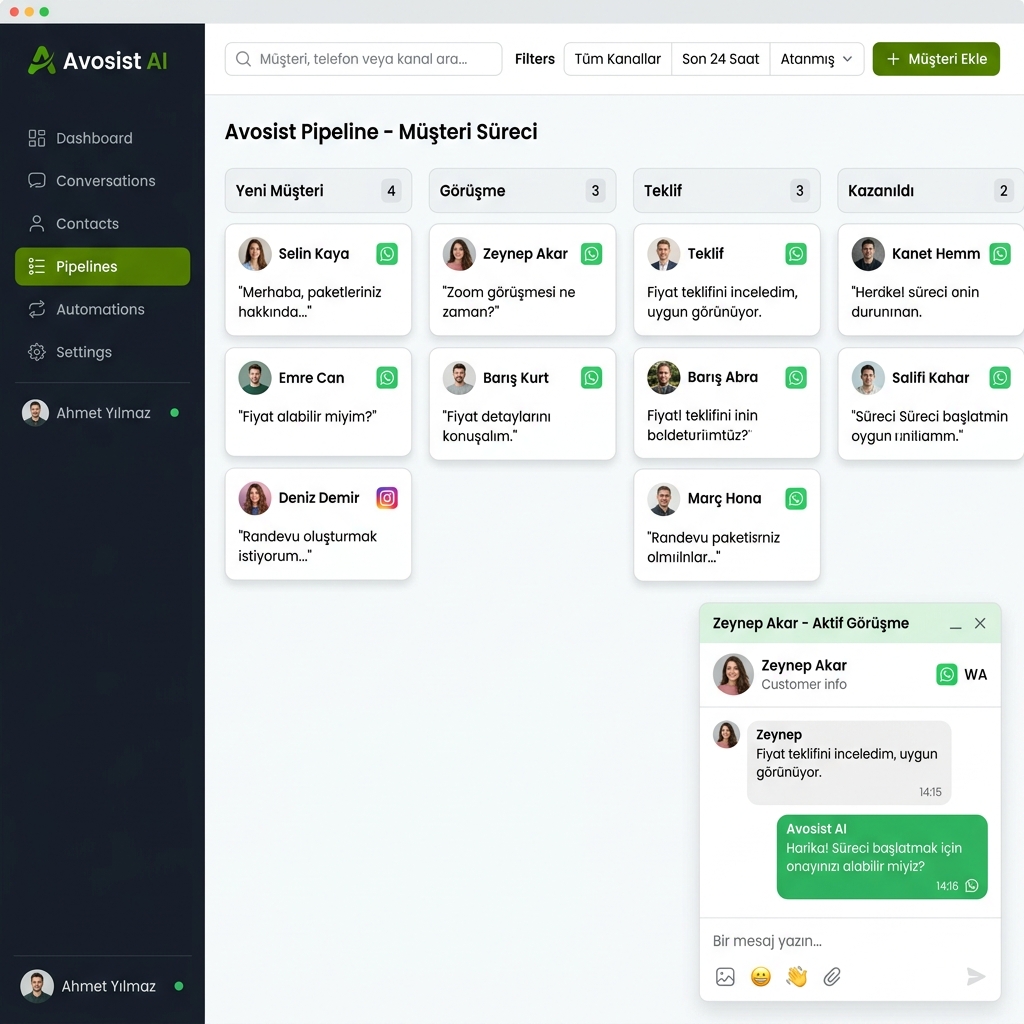
Visualize what stage your leads are in: First Contact → Proposal Sent → Meeting Held → Awaiting Decision → Won/Lost. Thanks to this pipeline, you clearly see every day which opportunity you should prioritize.
3. Automatic Reminders and Follow-ups
No more writing "Call Mr. Ahmet tomorrow" notes on Post-it papers. CRM sends automatic reminders to you and your team. Moreover, when integrated with automatic follow-up systems, it can also automatically send messages to the customer via WhatsApp or email.
4. Reporting and Analysis
Which source brings the most customers? What is the average sales cycle in days? Which product attracts the most interest? CRM answers these questions instantly and enables you to make data-driven decisions.
5. Inter-Team Coordination
Your sales, marketing, and customer service teams access the same customer data. Disagreements like "I am calling that customer, don't interfere" come to an end; everyone is on the same page.
📍 Attention: Research shows that 80% of untracked potential customers buy on the 5th contact, yet 44% of sales reps give up after just 1 follow-up attempt. CRM closes this gap.
Types of CRM: Which One is Right for You?
There are 3 main CRM categories in the market catering to different needs. Choosing the one most suitable for your small business directly affects both your cost and efficiency.
| CRM Type | Main Focus | Small Business Suitability | Cost | Avosist Integration |
|---|---|---|---|---|
| Operational CRM | Automates sales, marketing, and service processes | ✅ Highly Suitable | Medium | ✅ Full Integration |
| Analytical CRM | Customer data analysis and reporting | ⚠️ Partially Suitable | High | ✅ Reporting Support |
| Collaborative CRM | Inter-departmental data sharing | ⚠️ For Mid-Scale | High | ⚠️ Partial |
| WhatsApp-Based CRM | Customer management via chat | ✅ Most Suitable | Low | ✅ Built-in Feature |
| General Purpose SaaS CRM | Wide scope, many features | ⚠️ Can Be Complex | Variable | ✅ API Integration |
The most practical starting point for small businesses is to connect channels that your customers already use heavily to the CRM. Since the number of active WhatsApp users in Turkey exceeds 55 million, a WhatsApp-centric CRM approach is extremely effective especially for SMEs. For more information on this topic, you can review our WhatsApp Marketing guide.
How to Set Up a CRM for Small Businesses?
CRM setup is no longer an expensive IT project taking months. Modern cloud-based CRM systems can be brought to life within hours without requiring technical knowledge. Here is the step-by-step process:
Step 1: Conduct a Needs Analysis
How many team members do you have? How many customers are you dealing with simultaneously? Through which channels (phone, WhatsApp, Instagram, email) do you acquire customers? The answers to these questions determine the CRM features you need. For example, if your priority channel is WhatsApp, you should prioritize solutions that connect the channel directly to the CRM, such as the WhatsApp AI assistant.
Step 2: Gather Your Existing Customer Data
Excel files, notebooks, WhatsApp chats, email lists — bring all your customer data together. Most modern CRMs allow you to import this data into the system in minutes with a CSV file upload feature.
Step 3: Define Your Sales Pipeline
What stages does a lead go through from the moment they first contact you until they make a purchase decision? Create these stages in your CRM. For example: New Lead → Contacted → Demo Performed → Proposal Sent → Closed.
Step 4: Integrate Your Team
The value of a CRM emerges when the entire team uses the system. Involve your team members in the system, set roles and permissions. Everyone should work without skipping the system; every customer contact must be logged into the CRM.
Step 5: Set Up Automations
Send an automatic welcome message when a new lead enters. Send a follow-up message if the proposal remains unanswered for 3 days. Send a reminder 24 hours before the appointment. Automatic appointment reminder and automatic follow-up systems manage these processes with zero human intervention.
AI Integration
Answers customer questions 7/24, automatically saves important information to the CRM.
Automatic Lead Logging
Every lead coming from WhatsApp, Instagram, or web forms drops into the CRM instantly.
Segmentation
Group your customers based on behavior, location, or purchase history.
Campaign Management
Send the right message to the right segment, at the right time — with a single click.
WhatsApp and CRM Integration: The Weapon of the Modern Small Business
Traditional CRM systems tracked phone calls and emails. Today, the vast majority of your customers reach you via WhatsApp. The combination of these two worlds — WhatsApp and CRM — creates a game-changing power for your business.
With WhatsApp chatbot setup, the moment a lead messages via WhatsApp, they receive an automatic greeting, their need is identified, and a CRM record is created — even while you sleep. This process works as follows on the Avosist platform:
- Customer writes via WhatsApp — the AI assistant responds instantly
- Customer information is collected — name, need, budget, timeline are automatically recorded
- CRM record is created — customer card drops in front of your team
- Added to pipeline — which stage the lead is in, who is responsible, when to follow up are determined
- Automatic follow-up starts — if there is no response for 24 hours, the system sends a reminder message
- Included in campaign — appropriate campaign messages are sent automatically according to customer segments
Thanks to this integration, while a sales representative could previously handle 20 customers a day, they can now manage 100+ customers simultaneously. With Avosist's customer segmentation feature, you can also establish different communication flows for different groups.
Average sales revenue increase of SMEs using CRM (Nucleus Research).
Conversion rate of leads responded to within 5 minutes is 9 times higher.
An average return of 8.71 TL is provided for every 1 TL spent on CRM.
Businesses using CRM increase their customer retention rate up to 65%.
CRM Selection Criteria for Small Businesses
There are hundreds of CRM solutions in the market. While determining which one to choose as a small business, keep the following criteria in mind:
Ease of Use
In an SME without an IT department, a CRM system must be easily usable by everyone. Complex interfaces lead to the team not adopting the system and ultimately the CRM being useless. Prefer platforms with intuitive, drag-and-drop interfaces.
WhatsApp and Social Media Integration
Where do your customers communicate? WhatsApp, Instagram DM, Facebook Messenger — it is critical that messages coming from these channels flow directly into the CRM. You can also include DMs in the CRM flow with the Instagram AI assistant.
Pricing Model
For small businesses, feature-based or usage-based pricing is more sensible than a fixed fee per user. You should not pay for features you do not need at the start.
Scalability
Today you have a team of 3 people, in 1 year it will be 15 people. The CRM you choose must keep up with this growth; changing systems again means risking both time and data loss.
Turkish Support and Compliance with Local Regulations
To manage customer data within the scope of KVKK (Personal Data Protection Law), the CRM platform you choose must be compliant with local regulations. Turkish interface and local customer support also increase operational efficiency.
Set Up WhatsApp CRM Today with Avosist
Requires no technical knowledge. Transfer your customer data directly from WhatsApp to CRM, automate your sales.
Try Free →WhatsApp-Based CRM with Avosist: Featured Features
Avosist is a multi-channel assistant platform combining traditional CRM with WhatsApp automation power. It makes managing customer relationships both smarter and much faster for small businesses.
1. Automatic Customer Card Creation
Every new message coming from WhatsApp automatically creates a customer card in the system. Name, number, first contact time, and conversation history are recorded instantly. No more manual data entry.
2. Smart Customer Segmentation
Automatically divide your customers into groups based on purchase history, interests, location, or frequency of interaction. Apply custom campaigns, offers, and message templates to each segment. For details, you can review our customer segmentation page.
3. Campaign Management and Bulk Messaging
Create, schedule, and send segment-specific WhatsApp campaigns. Track metrics such as open rate, click-through rate, and conversion in real-time. Besides, with the AI sales consultant feature, your campaigns are personalized to achieve higher conversions.
4. Cold Customer Reactivation
The system automatically detects customers who haven't communicated for a long time and sends a special reactivation message. This feature recovers 15-25% of customers considered "lost" in many businesses.
- 7/24 AI response — customer gets a response in seconds even if they message at 2 AM
- Multi-channel management — WhatsApp, Instagram, Messenger, and voice assistant from a single panel
- Automatic appointment reminder — missed appointments decrease, revenue increases
- Ready-made message templates — dozens of industry-specific templates ready for instant use
- Real-time reporting — see instantly which message converts how much
- KVKK compliant infrastructure — your customer data is safe
If you operate in the e-commerce field, you can quickly build your CRM flows by checking out ready-made WhatsApp message templates for e-commerce. You can also take a look at the comparison of the best AI marketing tools of 2026.
5 Critical Mistakes Small Businesses Make in CRM
Setting up a CRM is not enough; it needs to be used correctly. The reasons why businesses cannot get the expected efficiency from their CRM investment usually lie in the following mistakes:
Mistake 1: Neglecting Data Entry
Customer information postponed with "I'll enter it later" is never entered. If every touch is not logged into the CRM immediately, the system remains an empty skeleton. Solution: Minimize manual data entry with automatic data collection tools like WhatsApp integration.
Mistake 2: Not Involving the Team
CRM was purchased, set up, but half of the team still relies on WhatsApp notes or paper agendas. In this case, CRM just becomes a cost. Pay special attention to the first 30 days for team training and the establishment of usage habits.
Mistake 3: Choosing an Overly Complex System
Trying to adapt a CRM designed for a 500-person company to your 5-person team is a waste of both time and money. Choose a system suitable for your needs, capable of growing, but simple at the start.
Mistake 4: Not Setting Up Automations
The real power of CRM is hidden in automations. Using it only as a record-keeping tool means using only 20% of the tool's potential. Be sure to automate follow-up messages, reminders, and campaigns.
Mistake 5: Not Reading Reports
CRM produces gold-standard data for you, but it means nothing if you don't look at this data. Review the pipeline report at least once a week, and monthly conversion rates and campaign performance.
🚀 Pro Tip: Focus on only 3 things in the first week of CRM setup: (1) Export the existing customer list, (2) Set up WhatsApp integration, (3) Set up the automatic welcome message. No need to overcomplicate — features can be added as the system grows.
Frequently Asked Questions
How much technical knowledge does a CRM require?
Modern cloud-based CRM systems, especially AI-powered platforms like Avosist, require no technical knowledge. You can create pipelines with drag-and-drop interfaces, prepare templates, and set up automations with a few clicks. An average of 1-2 hours is enough for a basic setup.
Is CRM mandatory for small businesses?
It is not mandatory, but if you are dealing with more than 10 leads a day, growing without a CRM becomes extremely difficult. Research shows that small businesses using CRM make 29% more sales and retain their customers 65% better compared to competitors. The cost is far below missed opportunities.
How does WhatsApp CRM integration work?
CRM systems connected via WhatsApp Business API automatically record all incoming messages. On platforms like Avosist, when the customer sends the first message, the system automatically creates a CRM record, the AI assistant steps in, qualifies the customer, and places them in the appropriate pipeline stage. All this process happens without human intervention.
How is customer tracking done with CRM?
A "card" is created for each customer in the CRM. This card contains contact information, past conversations, proposals, notes, and the next step timing. Thanks to automatic reminders, the system sends you a notification when the follow-up time comes even if you forget. With WhatsApp integration, these follow-ups can also be sent automatically as messages.
Does using CRM affect customer data under KVKK?
Yes, keeping customer data in a CRM creates a KVKK obligation. Explicit consent must be obtained from customers, data must be stored in secure infrastructures, and it must be deletable upon request. Domestic platforms like Avosist are designed to meet these requirements. We recommend updating your privacy policy and consent processes before setting up your system.
Conclusion: CRM is No Longer a Luxury, It's a Basic Need
In a competitive market, managing customer relationships not by remembering in your head, but with a system has become mandatory. CRM is a core infrastructure that strengthens customer tracking regardless of your business size, makes sales processes transparent, and multiplies your team's efficiency.
A CRM powered by WhatsApp integration creates an especially strong combination for small businesses in Turkey. Turning a channel your customers already use heavily — WhatsApp — into your sales machine both lowers costs and significantly increases conversion rates.
- Automatically record customer information — end manual data entry
- Visualize your sales pipeline, never miss an opportunity
- Respond to leads within 5 minutes with WhatsApp integration
- Accelerate follow-up processes with automation, let your team focus on real sales
- See with reports which channel, which message, and which segment converts the most
- Start today without technical knowledge with Avosist
Empower Your CRM with WhatsApp Today
Sign up for Avosist, set up your WhatsApp integration, and drop your first lead into the automatic CRM — today.
Get Started Free →